Apply as a travel agency
Listing tours on Joinero is free during the community test. Every agency goes through a short KYC (Know Your Customer) review before listings go live — this page walks through exactly what that looks like inside the app, screen by screen.
1. Download the app
Everything below happens inside the Joinero Android app, not on this website. If you haven't installed it yet, grab the signed APK first — it walks through downloading, verifying, and installing, including the Google Play Protect screens.
Get the app — install walkthrough2. Choose "I'm a travel agency"
Open the app and sign in (or create an account). You'll be asked "How will you use Joinero?" — pick I'm a travel agency and tap Continue.
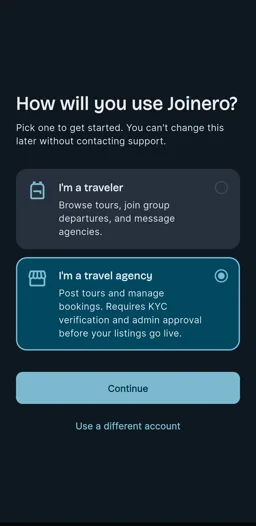
This choice sticks. You can't switch between traveler and agency later without contacting help@joinero.app. If you also want to travel with Joinero personally, use a separate account for that.
3. Complete agency verification
A 3-step form. These clips are real screen recordings of an agency signing up — not mockups.
-
1
Business details
Business name, registered legal name, a short description of your agency, contact email and phone, an optional website, and your business address. This is what travelers and Joinero admins reviewing your application will see.
Step 1 of 3: Business details -
2
Documents
Upload clear photos or scans (JPG, PNG, or PDF, up to 10MB each): a DTI Certificate or Business Permit, your BIR Registration, and a government ID (front and back). These are only visible to you and the Joinero review team.
Step 2 of 3: Documents -
3
Review & submit
Double-check your business name, contact email, and contact phone, then tap Submit for review. You'll see an "Application submitted" confirmation right away.
Step 3 of 3: Review & submit
4. What happens next
A Joinero admin reviews your documents — this usually takes 1-3 business days. You'll be notified once your agency is verified, and your account picks up a verified badge the moment it's approved.
- Free during the community test — no listing fees while Joinero is in this early phase.
- Nothing to redo — once approved, you can post tours and manage departures straight away with the details you already submitted.
- Questions or stuck partway through? Email help@joinero.app and we'll help you sort it out.